You have premium but the channels are hidden
Discord hides most channels when you join a server, including the premium ones you have access to. You turn Show All Channels on once, and they stay.
First, check your Discord is connected
Open your account page. Next to Discord you should see Connected ✓.
If you see a Connect link instead, that's the actual problem. Start with I paid but I don't see my premium access, then come back here.
If your account page says "billed through Stan", there's no Discord row at all. Skip to the next step.
Turn on Show All Channels
On a computer or in a web browser
- Open the SheCanInvest server.
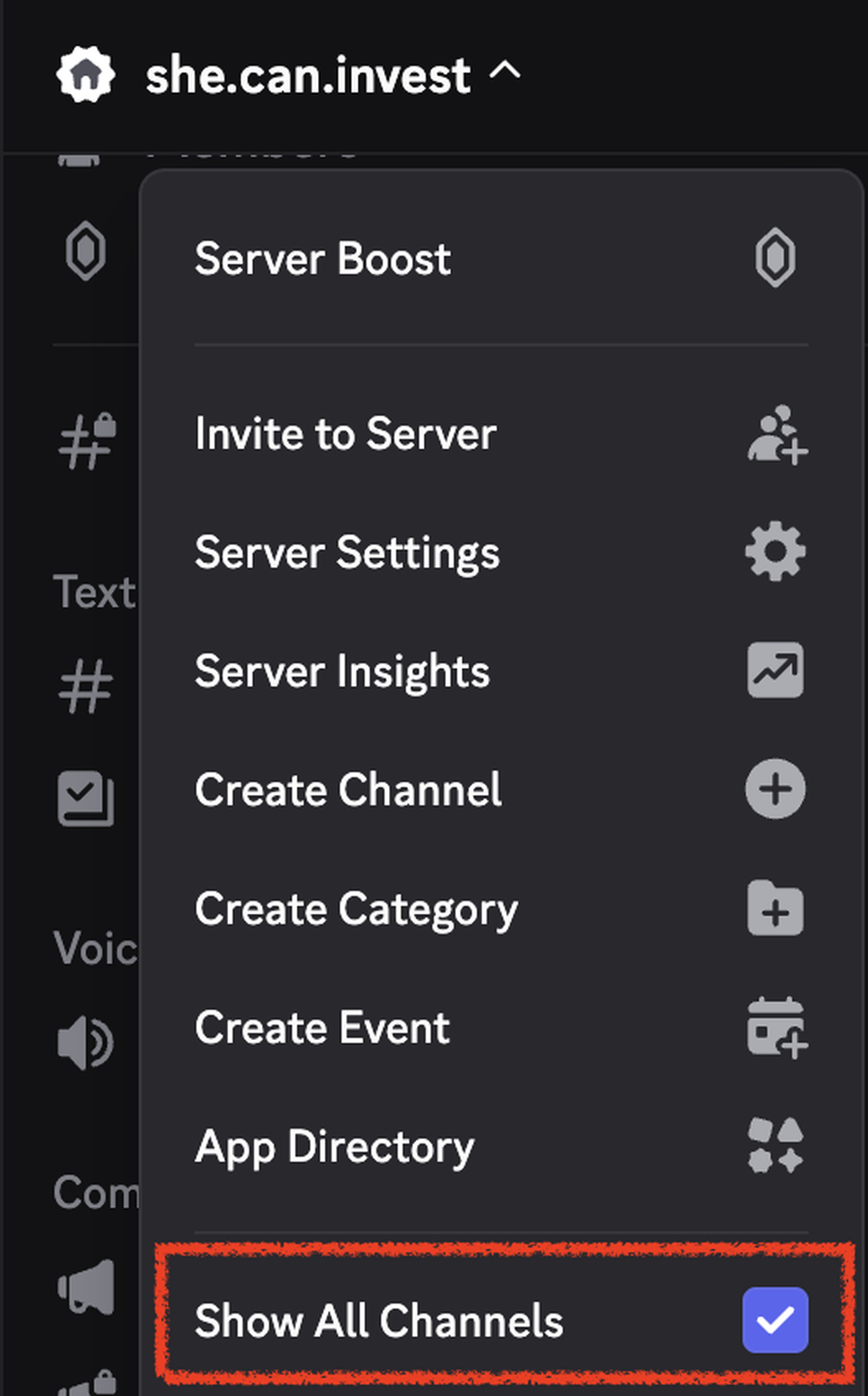
- Click the server name at the very top of the channel list. A menu drops down.
- Turn on Show All Channels.
On your phone
- Open the SheCanInvest server.
- Tap the three dots next to the server name at the top. If you don't see three dots, tap the server name itself.
- Turn on Show All Channels.
Your premium channels show up right away. Here's what each one is for.
If they're still not showing
Log out of Discord and log back in.
Then check you're signed in to the same Discord account you connected on your account page. If you have more than one, it's easy to be looking at the wrong one.
If your account page says Connected ✓, Show All Channels is on, and you've logged out and back in, email support@shecaninvest.com from the address you paid with.
Didn’t answer your question? Email support@shecaninvest.com.